
Installation Instructions Hush-Hush Data Masking Components
Hush-Hush Data Masking Components are available through three interfaces – SSIS Data Flow components, SQL Server CLR functions, and a .NET API – and the same installer also installs the Sensitive Data Discovery Tool (SDDT) client. All four share the same base prerequisites and installer, and requesting a trial, registering a license, and how deterministic masking keeps its key work the same way across all of them. Each also has prerequisites and setup steps of its own, covered in its own section below.
Common Prerequisites
-
Windows 10*, Windows 11 (recommended)
-
.NET Framework 4.6.2 or higher
* Windows 10 is supported with reduced testing. Microsoft provides only security updates for it until 12 October 2027. We recommend using Windows 11.
See each product's section below for prerequisites specific to it.
Requesting a Trial
Request a trial from the product page, or through the Request menu available anywhere on the site. You'll receive an email with a download link and installation instructions.
The trial is valid for one week. After it expires, the software notifies you and stops working. The trial has limited functionality – it's meant to let you evaluate the components, not for production use. The production version includes full functionality.
Installation Steps
-
Download and unzip the installation archive.
-
Run the installer.
-
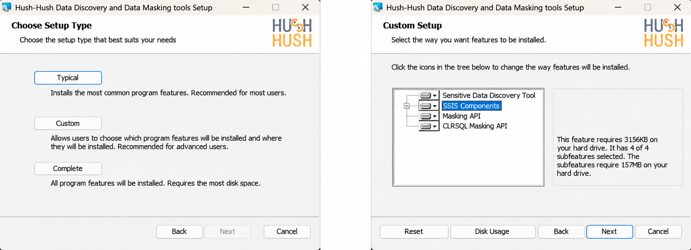
Step through the setup wizard: accept the license agreement, then choose Typical to install every component, or Custom to select specific ones – SSIS, CLR, API, or SDDT.
See each product's section below for any additional setup steps after the installer finishes.
License Registration
A production license is bound to the hardware it runs on. To register one:
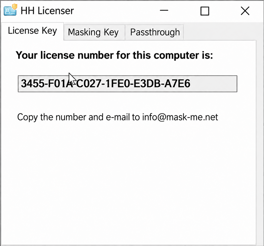
- Obtain your Hardware ID. Run HushHushLicenser.exe, found at %ProgramFiles(x86)%\HushHush\SSIS\Tools
- Email the Hardware ID to info@mask–me.net.
- Place the license file you receive at %ProgramData%\HushHush\ for SSIS/API components and SDDT or at %PUBLIC%\Documents\HushHush\ for CLR components.
Masking Key
A deterministic ("Dynamic") masking method needs a persisted key to produce the same masked output for the same input every time. The .NET API creates this key automatically the first time you call a Dynamic method, at %ProgramData%\HushHush\HushHush.settings.
The process needs write access to %ProgramData%\HushHush\ the first time a Dynamic method runs. Without it, that first call fails.
 Download Hush-Hush Data Masking Components Manual
 Go to Developer Center
Installation Instructions Sensitive Data Discovery Tool
Prerequisites
-
Microsoft SQL Server 2016, 2017, 2019, or 2022, with SSIS installed
-
Hush-Hush SSIS Components – required to generate packages
-
Microsoft OLE DB Driver for SQL Server (MSOLEDBSQL) – x32 and x64 (required for SQL Server as source or destination). Or SQL Server Native Client 11.0 (SQLNCLI11) as fallback (deprecated).
-
Connectors for Oracle, MySQL, IBM DB2, and DB2 Client (optional):
-
-
For MySQL connectivity:
-
-
-
MySQL ODBC Driver 8.0 – x32 and x64
-
-
For Oracle connectivity:
-
-
Oracle Data Access Components (ODAC) – x32 and x64
-
-
For DB2 connectivity:
-
-
IBM DB2 Driver – x32 and x64
-
IBM DB2 Client – x32 and x64
-
Note: Visual Studio with SSDT BI is not required to run SDDT itself – analyzing a source and generating a package don't need it. It's only needed if you want to open or edit the generated SSIS package in SSIS Designer.
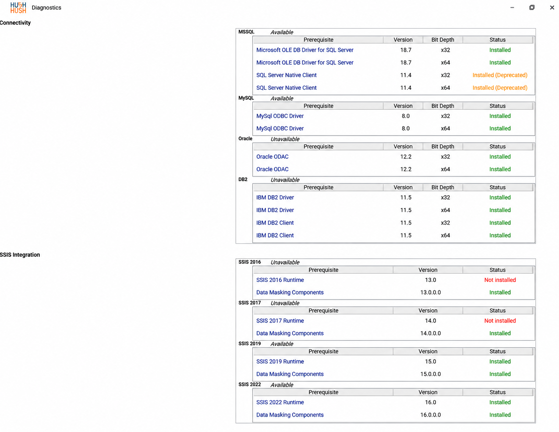
Verify the installation. Open SDDT and select Help > Diagnostics. This checks for the assemblies, registry keys, and database providers SDDT needs.
Installation Instructions SSIS Data Masking Components
Development environment (design–time)
-
Microsoft SQL Server 2016, 2017, 2019, or 2022 (optional)
-
Visual Studio 2017, 2019, or 2022 with SQL Server Data Tools for Business Intelligence (SSDT BI)
Run–time environment (execution–time)
-
Windows Server, matching your SQL Server requirements
-
Microsoft SQL Server 2016, 2017, 2019, or 2022 with SSIS installed
Deploy a package to an SSIS Catalog (SSISDB) on a SQL Server instance and schedule it with SQL Server Agent, or deploy it to the file system and run it manually or on a schedule with dtexec.
Installation notes. In Visual Studio 2019 and 2022, SSIS is not included in SSDT by default – install it separately as an extension. For installation instructions for SQL Server Integration Services (SSIS), Visual Studio, and SQL Server Data Tools for Business Intelligence (SSDT BI), see the official Microsoft documentation.
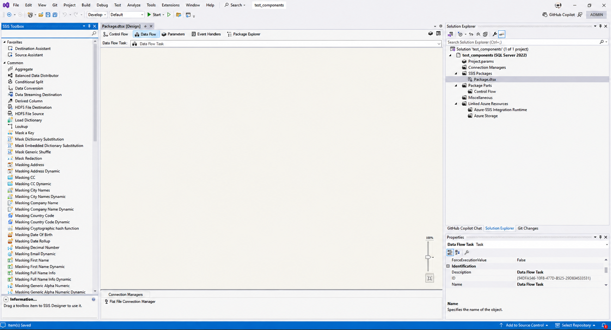
Verify the installation. Open Visual Studio and check that the Hush-Hush components appear in the SSIS Toolbox.
Installation Instructions API (.NET) Data Masking Components
Prerequisites
-
The API targets .NET Framework 4.6.2, or 4.7.2 for the SQL Server 2017/2019 variant. It does not support .NET Core or .NET 5+.
The installer places MaskingLogic.dll under %ProgramFiles(x86)%\HushHush\MaskingAPI\net40 and registers it in the GAC.
Reference all three assemblies at runtime, not just the main one:
-
MaskingLogic.dll
-
HH.Common.DataContracts.dll
-
HH.Common.SettingsAdapter.dll
Add using HushHush.MaskingLogic.SSRS; and call the static methods on the Mask class. No instantiation or dependency injection is needed.
Verify the installation. Check that the installed files are present, for example via Command Line:
dir "%ProgramFiles(x86)%\HushHush\MaskingAPI\net40"Installation Instructions CLR Data Masking Components
Prerequisites
-
Microsoft SQL Server 2016, 2017, 2019, or 2022
Enable CLR on the target SQL Server
Connect as database owner and run:
sp_configure @configname=clr_enabled, @configvalue=1
GO
RECONFIGURE
GO
Then run InstallCLR.sql, found under %ProgramFiles%\HushHush\api, against each database that will use the CLR functions.
Verify the installation. After running the installation SQL script, run:
SELECT * FROM sys.assemblies WHERE name = 'MaskingCLR';A returned row confirms the assembly is registered.